
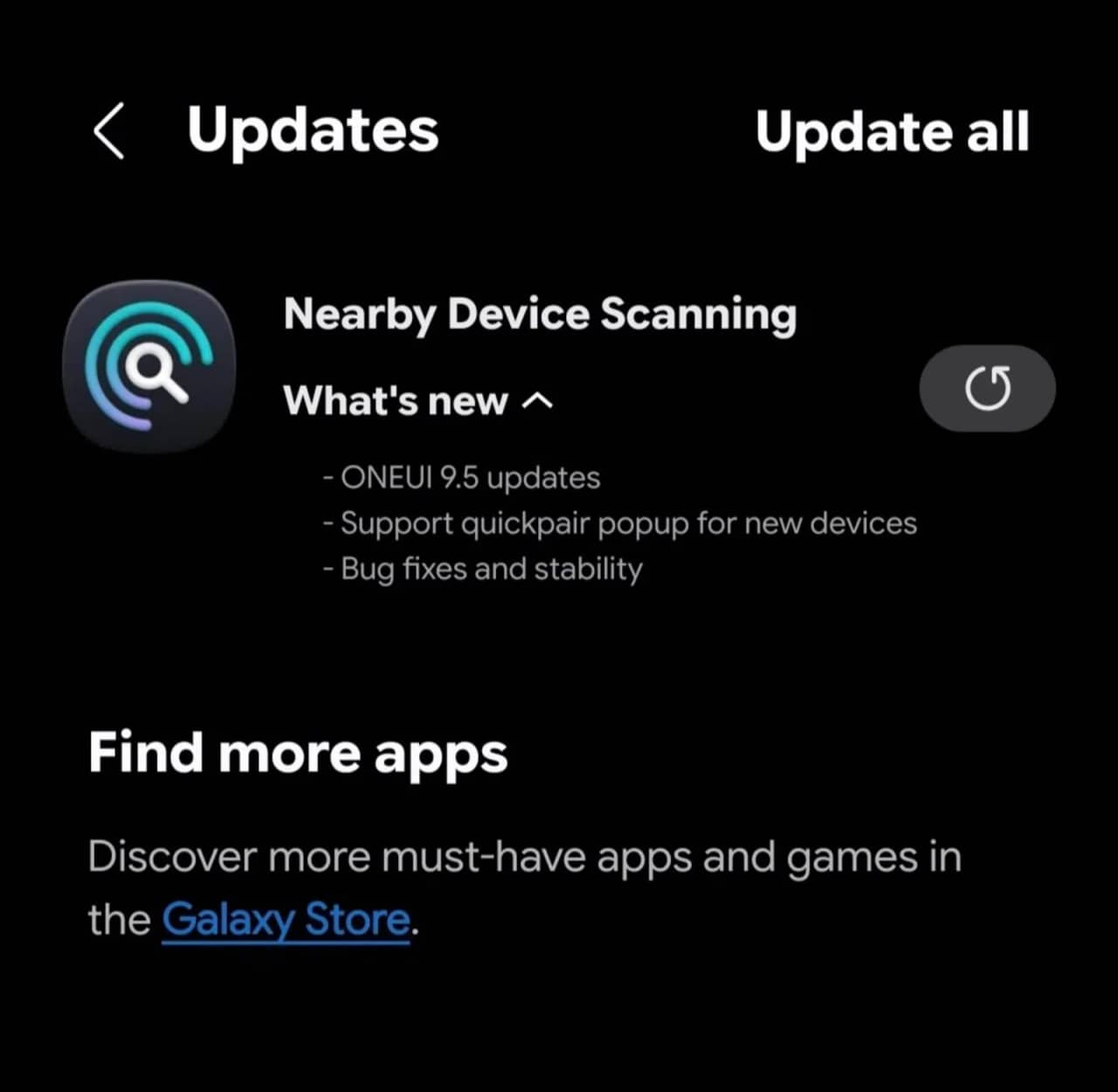
Samsung's Nearby Device Scanning app is receiving attention as the company develops One UI 9.5. Here is what the available evidence reveals about the app, its role in the Galaxy ecosystem, and what users should know before expecting new features.
Samsung's Nearby Device Service Is Preparing for Another Software Cycle
Samsung's Nearby Device Scanning is a system component that helps Galaxy phones and tablets discover compatible devices and simplify their initial setup. It works with Samsung products such as Galaxy Buds, Galaxy Watches, S Pen accessories, and SmartThings-compatible devices.
Samsung describes the service on its official Galaxy Store listing, where it is published by Samsung Electronics.
The service is particularly useful when setting up a new accessory. Rather than manually navigating through several connection menus, users can receive prompts that help them discover and connect compatible devices.
The component also plays a role in Samsung's wider connected-device experience, making it relevant as the company develops new software features and expands its hardware ecosystem.
What the Latest Update Means for One UI 9.5
Samsung is developing One UI 9.5, but the software's development status matters when interpreting changes discovered in system applications.
As of October 1, 2026, Samsung has not publicly confirmed a final One UI 9.5 feature list or a general release date. Early findings from internal software builds should therefore be treated as development evidence rather than confirmation that a feature will reach every Galaxy device.
SamsVerge has previously reported on Samsung's One UI 9.5 testing, including the distinction between internal firmware development and a public release.
An application update can prepare a system component for changes in a future version of One UI. It does not necessarily mean that those changes are already available to users running the current stable software.
There is also an important distinction between updating Nearby Device Scanning and updating the phone's operating system. The former updates an individual system component; the latter delivers broader platform and interface changes.
Without verified release notes identifying the precise changes in the latest package, it would be premature to attribute specific One UI 9.5 features to the application update.
How Nearby Device Scanning Works on Galaxy Phones
Nearby Device Scanning is designed to simplify the discovery and setup of compatible devices around a Galaxy phone or tablet.
Samsung's official connection settings guide explains that enabling the feature allows the phone to scan for nearby devices and send notifications when devices are available to connect.
The feature is particularly relevant to Samsung's ecosystem because a single Galaxy phone can serve as the starting point for setting up multiple accessories.
For example, a user setting up a compatible Galaxy Watch or pair of Galaxy Buds may benefit from nearby-device discovery instead of manually searching through connection settings.
Compatibility depends on the accessory, the Galaxy device, and the relevant software. Not every nearby Bluetooth device will necessarily appear through Samsung's discovery interface.
How to Check for a Nearby Device Scanning Update
Galaxy owners can check the Galaxy Store for available updates without waiting for a full One UI upgrade.
- Open the Galaxy Store on your Samsung phone.
- Tap Menu.
- Select Updates.
- Look for Nearby Device Scanning or its related system-app listing.
- If an update is available, follow the on-screen instructions to install it.
Menu labels can vary depending on the Galaxy Store version and region. Some system components may also update automatically or may not appear as ordinary user-installed apps.
You can also visit Samsung's Nearby Device Scanning listing to check the available app information.
Installing an application update does not guarantee that a future One UI feature will become available. Some functionality depends on the phone's firmware and supported hardware.
Which Galaxy Devices Could Benefit?
Nearby Device Scanning supports Galaxy smartphones and tablets, but the availability of individual features can differ across models and software versions.
The development of One UI 9.5 is therefore relevant to Galaxy owners who use Samsung accessories, although Samsung has not confirmed a device-by-device compatibility list for the upcoming software.
Owners of newer Galaxy phones should not assume that every feature found in an internal build will be included in the final update. Older devices may also receive different functionality depending on their software support status and hardware capabilities.
For the broader software picture, SamsVerge's One UI 9 update coverage provides additional context about the current generation of Samsung software and its rollout.
Samsung's final release notes and device-specific update announcements will be needed to establish which changes become generally available.
What Samsung Has Confirmed and What Remains Unknown
There are three points Galaxy owners should keep in mind.
Confirmed: Samsung provides Nearby Device Scanning as a system service for discovering and setting up compatible nearby devices. The company also makes the component available through its Galaxy Store ecosystem.
Still unconfirmed: The precise changes included in the latest update associated with One UI 9.5 development, the complete list of affected devices, and whether every reported change will appear in the final software.
Not yet established: A public One UI 9.5 rollout schedule and universal availability of any newly discovered Nearby Device Scanning functionality.
These distinctions matter because system-app updates can arrive independently of major operating-system releases. Finding a newer application package does not, by itself, establish that Samsung has launched a new One UI version or enabled a particular feature for users.
For now, Galaxy owners can check the Galaxy Store for app updates and continue using the existing nearby-device discovery features supported by their devices. More definitive information about One UI 9.5 will depend on Samsung's official announcements and the final software release.




Responses (0 )